design system

When your design system becomes a bottleneck

Fixing a legacy design system by eliminating design and technical debt to restore speed, consistency, and scale across a global B2B product.

Role:

Design system owner

Role:

Design system owner

Project Type:

Design system transformation

Project Type:

Design system transformation

Duration:

6 weeks

Duration:

6 weeks

Intro

Managing a design system for a global B2B platform is a constant balance between consistency and speed of delivery. In the project I joined, I was working with a 3-year-old library that, instead of supporting growth, had become a bottleneck.

There were plans to launch the product in new markets, and in its current state this would require hours of manual, repetitive work. With the growing scale of the product, this created high costs, as well as a high risk of errors and delays.

As a Product Designer responsible for maintaining the library, I identified an urgent need to transform the system - moving from static components to full automation based on variables, fully using Figma’s capabilities.

In this case study, I show how I eliminated design and technical debt and closed the gap between design and code, creating a scalable Single Source of Truth environment that consisted of the Figma variables-based library, aligned token naming, and governed documentation - used consistently by design and engineering that significantly accelerated the work between team.

Project Overview

Product:

Global B2B platform (Web & App) for engaging and educating retail sellers

🌐

My Role:

Product Designer / Design System Owner

🧩

Scale:

36 markets (including Canada, Mexico, Egypt, Singapore)

🗺️

Team size:

4 Product Designers, 23 Developers, Product Owner

🧑‍💻

Responsibility:

Audit, reorganization of the component library, automation implementation, and process optimization

⚙️

Problem & Insight

With plans to scale the platform to new markets, our existing library reached its limits. What initially were small inconsistencies turned into system-level blockers.

The lack of automation and failure to adopt new Figma features made consistency a manual process, while additional mismatches with development created an environment prone to errors and inefficiency.

Issues identified during the audit

Risk of human error

No color automation

Each new market required a new brand. Without global color management, every screen had to be updated manually.

Rigid typography

Desktop and mobile styles did not switch automatically, forcing manual and error-prone font size changes.

Broken components

Interaction bugs

Common elements such as inputs and buttons contained many errors, reducing daily work performance.

Faulty icons

Icons did not scale correctly and broke during swaps inside more complex components.

Overloaded library

Unused styles, legacy components, and missing tokens made navigation and correct value assignment difficult.

Gap between Design and Code

No shared language

Naming differences slowed hand-off and forced developers to interpret designs instead of implementing quickly.

Inconsistent data structure

Colors, shadows, and typography in Figma did not match the structure used by developers

Slower development

Lack of standardized components and constant “translation” from design to code increased Time-to-Market.

Process chaos

No version control

There was no clear split between working, production, and archive files, risking overwriting approved designs.

Unclear source of truth

The team did not know which file was the SSOT, creating fear of implementing outdated designs.

No procedures

There were no defined rules for change requests or releases, making project history hard to track.

Risk of human error

No color automation

Each new market required a new brand. Without global color management, every screen had to be updated manually.

Rigid typography

Desktop and mobile styles did not switch automatically, forcing manual and error-prone font size changes.

Broken components

Interaction bugs

Common elements such as inputs and buttons contained many errors, reducing daily work performance.

Faulty icons

Icons did not scale correctly and broke during swaps inside more complex components.

Overloaded library

Unused styles, legacy components, and missing tokens made navigation and correct value assignment difficult.

Gap between Design and Code

No shared language

Naming differences slowed hand-off and forced developers to interpret designs instead of implementing quickly.

Inconsistent data structure

Colors, shadows, and typography in Figma did not match the structure used by developers

Slower development

Lack of standardized components and constant “translation” from design to code increased Time-to-Market.

Process chaos

No version control

There was no clear split between working, production, and archive files, risking overwriting approved designs.

Unclear source of truth

The team did not know which file was the SSOT, creating fear of implementing outdated designs.

No procedures

There were no defined rules for change requests or releases, making project history hard to track.

Risk of human error

No color automation

Each new market required a new brand. Without global color management, every screen had to be updated manually.

Rigid typography

Desktop and mobile styles did not switch automatically, forcing manual and error-prone font size changes.

Broken components

Interaction bugs

Common elements such as inputs and buttons contained many errors, reducing daily work performance.

Faulty icons

Icons did not scale correctly and broke during swaps inside more complex components.

Overloaded library

Unused styles, legacy components, and missing tokens made navigation and correct value assignment difficult.

Gap between Design and Code

No shared language

Naming differences slowed hand-off and forced developers to interpret designs instead of implementing quickly.

Inconsistent data structure

Colors, shadows, and typography in Figma did not match the structure used by developers

Slower development

Lack of standardized components and constant “translation” from design to code increased Time-to-Market.

Process chaos

No version control

There was no clear split between working, production, and archive files, risking overwriting approved designs.

Unclear source of truth

The team did not know which file was the SSOT, creating fear of implementing outdated designs.

No procedures

There were no defined rules for change requests or releases, making project history hard to track.

Goals & Success Criteria

Before creating the first component, my key challenge was building a shared understanding of the problem across the organization. I did not present this project as a “UI facelift”. I positioned the Design System as a strategic enabler of speed, consistency, and scalability. To overcome resistance, I tailored the message to each stakeholder group.

Engineering Leadership

⚠️

Concern

Fear of spending time “rewriting” repositories.

🧠

Argument

I showed that the existing chaos (inconsistent naming and missing typography tokens) created massive technical debt. I promised a library whose structure would mirror the code, significantly reducing implementation time.

Product & Business

⚠️

Concern

Fear that standardization would limit flexibility for local markets.

🧠

Argument

I shifted the focus from “limitations” to scalability. With Variables, new markets could be launched in days instead of weeks, with full control over branding.

Design Team

⚠️

Concern

Loss of creative freedom and fear that system changes would break existing screens.\

🧠

Argument

I explained that automation would remove repetitive tasks and free time for real UX problem-solving, while system changes would be handled safely and continuously improved.

Strategic Goals

Velocity

Faster delivery from concept to implementation using ready-made building blocks.

📈

Scalability

Creating a foundation that allows new markets to be added without exponential cost growth.

🧩

Consistency

Eliminating visual differences across markets and platforms to build user trust and a strong global brand.

Projected Impact & Target KPIs

📉

+/- 40–50% reduction in frontend implementation time

Thanks to full alignment of token and component names between Figma and code

⏱️

+/- 2× faster prototyping

Designers could create high-fidelity views in half the previous time

🚀

+/- 80% faster market adaptation

Replacing manual screen edits with automatic variable mode switching

Engineering Leadership

⚠️

Concern

Fear of spending time “rewriting” repositories.

🧠

Argument

I showed that the existing chaos (inconsistent naming and missing typography tokens) created massive technical debt. I promised a library whose structure would mirror the code, significantly reducing implementation time.

Product & Business

⚠️

Concern

Fear that standardization would limit flexibility for local markets.

🧠

Argument

I shifted the focus from “limitations” to scalability. With Variables, new markets could be launched in days instead of weeks, with full control over branding.

Design Team

⚠️

Concern

Loss of creative freedom and fear that system changes would break existing screens.\

🧠

Argument

I explained that automation would remove repetitive tasks and free time for real UX problem-solving, while system changes would be handled safely and continuously improved.

Strategic Goals

Velocity

Faster delivery from concept to implementation using ready-made building blocks.

📈

Scalability

Creating a foundation that allows new markets to be added without exponential cost growth.

🧩

Consistency

Eliminating visual differences across markets and platforms to build user trust and a strong global brand.

Projected Impact & Target KPIs

📉

+/- 40–50% reduction in frontend implementation time

Thanks to full alignment of token and component names between Figma and code

⏱️

+/- 2× faster prototyping

Designers could create high-fidelity views in half the previous time

🚀

+/- 80% faster market adaptation

Replacing manual screen edits with automatic variable mode switching

Engineering Leadership

⚠️

Concern

Fear of spending time “rewriting” repositories.

🧠

Argument

I showed that the existing chaos (inconsistent naming and missing typography tokens) created massive technical debt. I promised a library whose structure would mirror the code, significantly reducing implementation time.

Product & Business

⚠️

Concern

Fear that standardization would limit flexibility for local markets.

🧠

Argument

I shifted the focus from “limitations” to scalability. With Variables, new markets could be launched in days instead of weeks, with full control over branding.

Design Team

⚠️

Concern

Loss of creative freedom and fear that system changes would break existing screens.\

🧠

Argument

I explained that automation would remove repetitive tasks and free time for real UX problem-solving, while system changes would be handled safely and continuously improved.

Strategic Goals

Velocity

Faster delivery from concept to implementation using ready-made building blocks.

📈

Scalability

Creating a foundation that allows new markets to be added without exponential cost growth.

🧩

Consistency

Eliminating visual differences across markets and platforms to build user trust and a strong global brand.

Projected Impact & Target KPIs

📉

+/- 40–50% reduction in frontend implementation time

Thanks to full alignment of token and component names between Figma and code

⏱️

+/- 2× faster prototyping

Designers could create high-fidelity views in half the previous time

🚀

+/- 80% faster market adaptation

Replacing manual screen edits with automatic variable mode switching

Process

1

1

Diagnosing real problems

I started with an audit, collecting facts, data, and feedback from teams to clearly identify issues and estimate effort.

Identifying technical debt

👉

I interviewed designers who used the library daily.

👉

I interviewed designers who used the library daily.

👉

Components contained many bugs and no longer met current needs.

👉

Components contained many bugs and no longer met current needs.

👉

Some components failed WCAG requirements, including the minimum 3:1 contrast.

👉

Some components failed WCAG requirements, including the minimum 3:1 contrast.

👉

Icons caused the most frustration - poor scaling and color issues.

👉

Icons caused the most frustration - poor scaling and color issues.

Based on this, I created a prioritized rebuild plan, starting with the most used and unstable components.

Design–Code analysis
👉

Developer interviews revealed naming and structural mismatches.

👉

Developer interviews revealed naming and structural mismatches.

👉

This caused long hand-offs and frequent misunderstandings.

👉

This caused long hand-offs and frequent misunderstandings.

👉

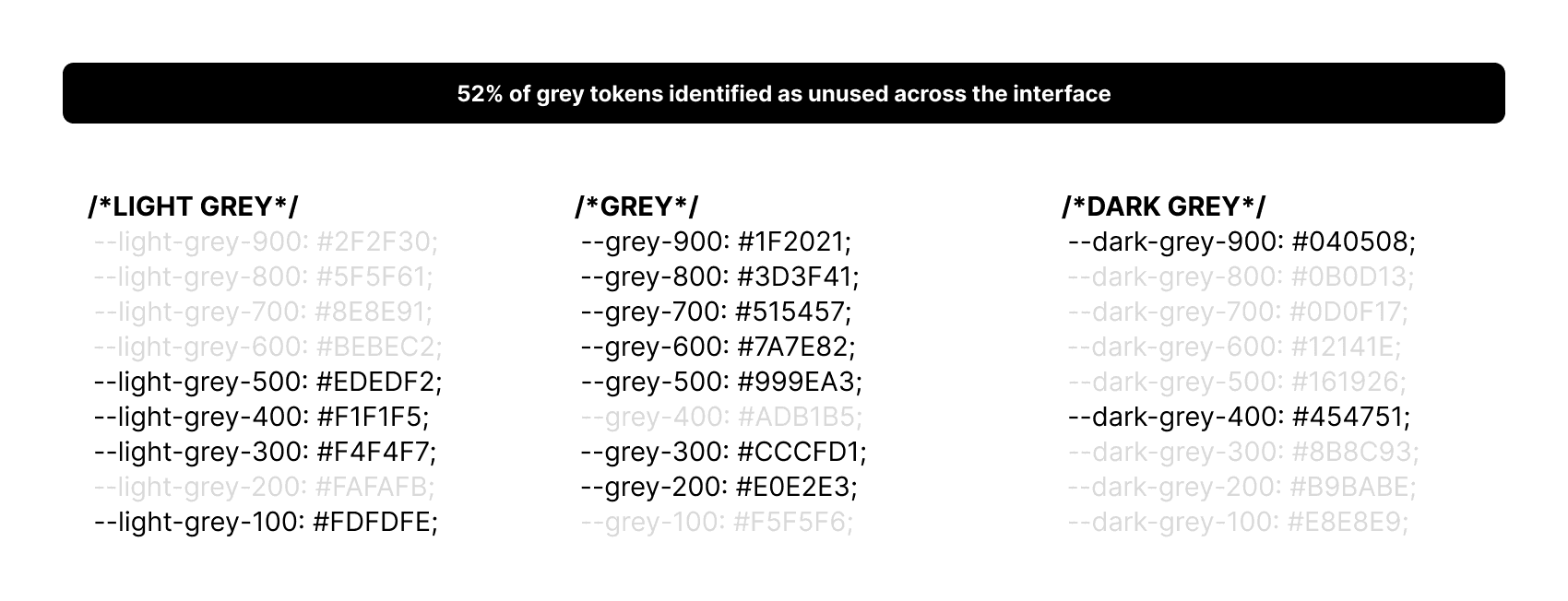
40% of gray tokens were never used, making color selection difficult.

👉

40% of gray tokens were never used, making color selection difficult.

👉

The color system required optimization to reflect real usage.

👉

The color system required optimization to reflect real usage.

During the audit, I identified tokens that have never been used

Style audit
👉

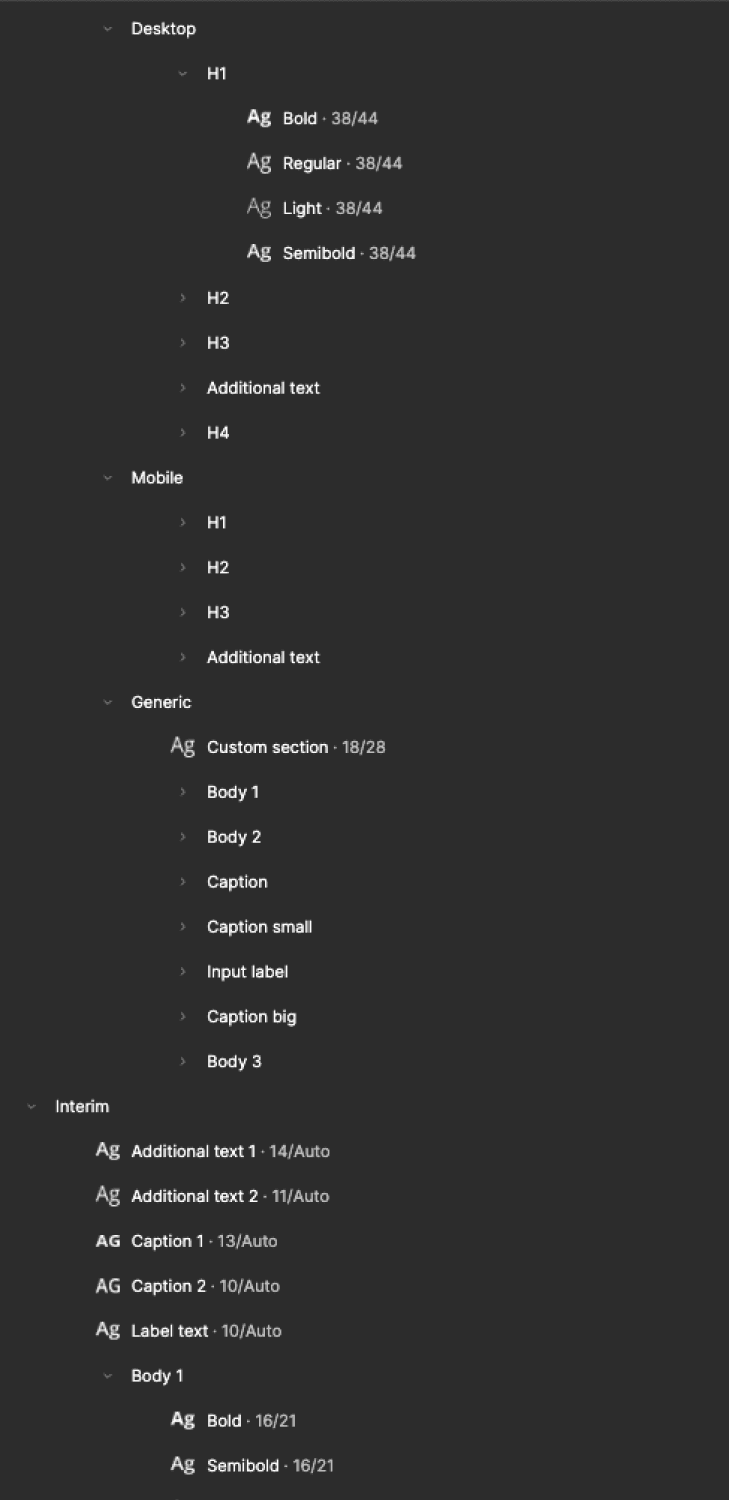
Typography chaos forced manual RWD changes, causing errors and wasted time.

👉

Typography chaos forced manual RWD changes, causing errors and wasted time.

👉

Typography chaos forced manual RWD changes, causing errors and wasted time.

👉

Files contained unused experimental leftovers.

👉

Files contained unused experimental leftovers.

👉

Files contained unused experimental leftovers.

👉

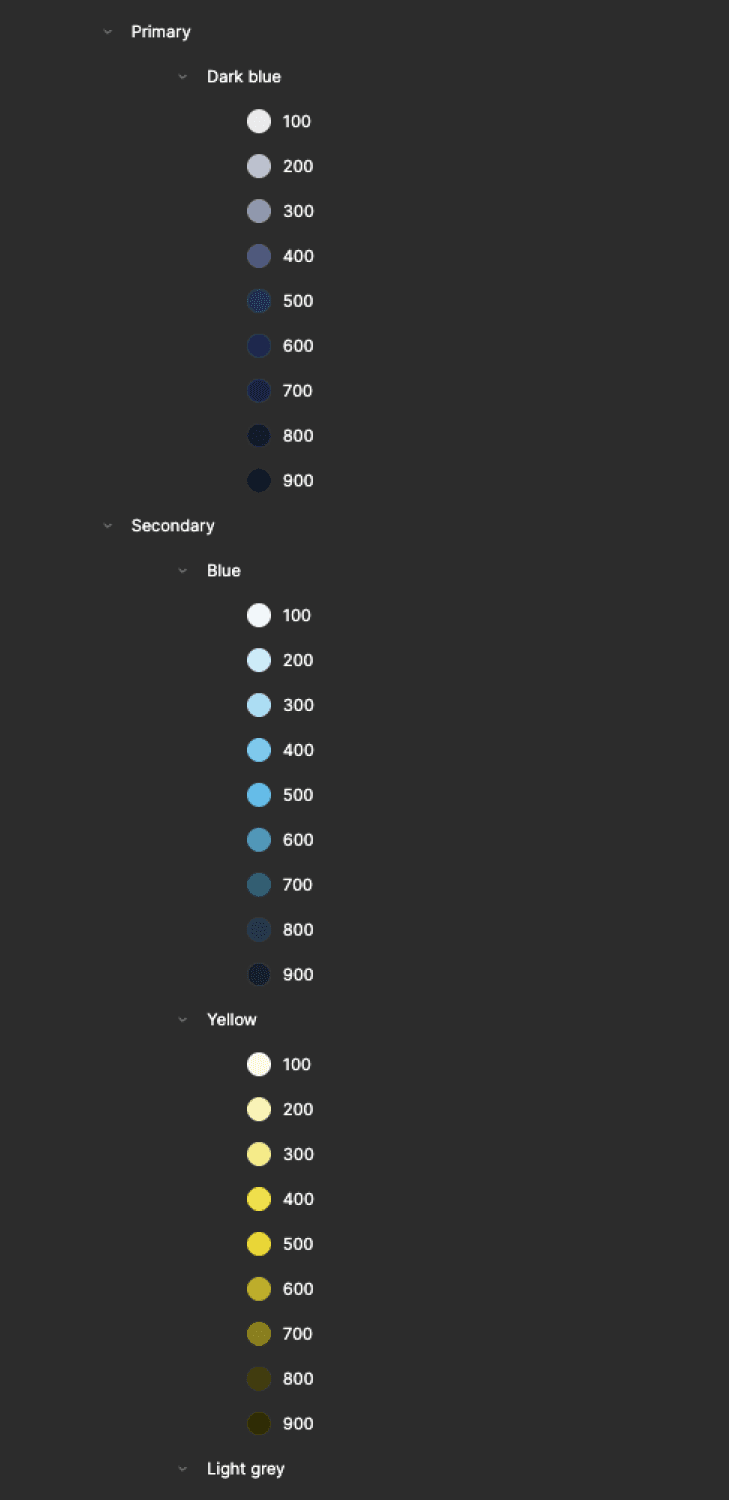
Colors used physical names (e.g. Blue/500), which broke logic after rebranding.

👉

Colors used physical names (e.g. Blue/500), which broke logic after rebranding.

👉

Colors used physical names (e.g. Blue/500), which broke logic after rebranding.

An example of how styles were organized before the transformation.

Result

Optimize the color palette and introduce Variables for typography to automate responsive behavior.

Solution

Optimize the color palette and introduce Variables for typography to automate responsive behavior.

2

Structure planning

2

Color tokenization

A two-level system was introduced to separate raw values from meaning.

Level 1 Primitives (Raw Values)
👉

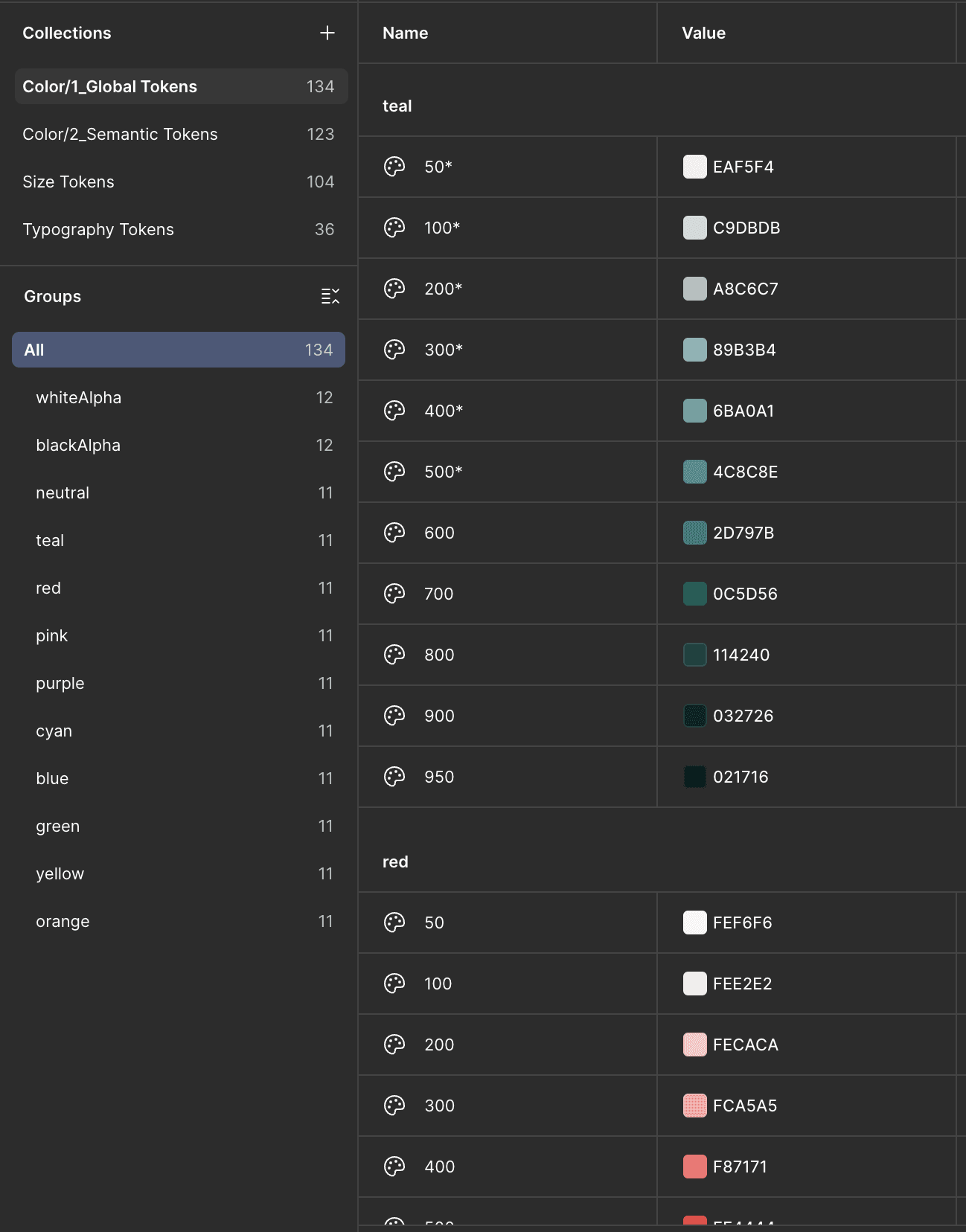
Existing colors were treated as primitives.

👉

Existing colors were treated as primitives.

👉

Each color group had shades from 50 to 950.

👉

Each color group had shades from 50 to 950.

👉

Each color group had shades from 50 to 950.

👉

This preserved existing component connections and created reusable value reserves.

👉

This preserved existing component connections and created reusable value reserves.

👉

This preserved existing component connections and created reusable value reserves.

The Figma variables screenshot shows the color organization of global tokens (level 1).

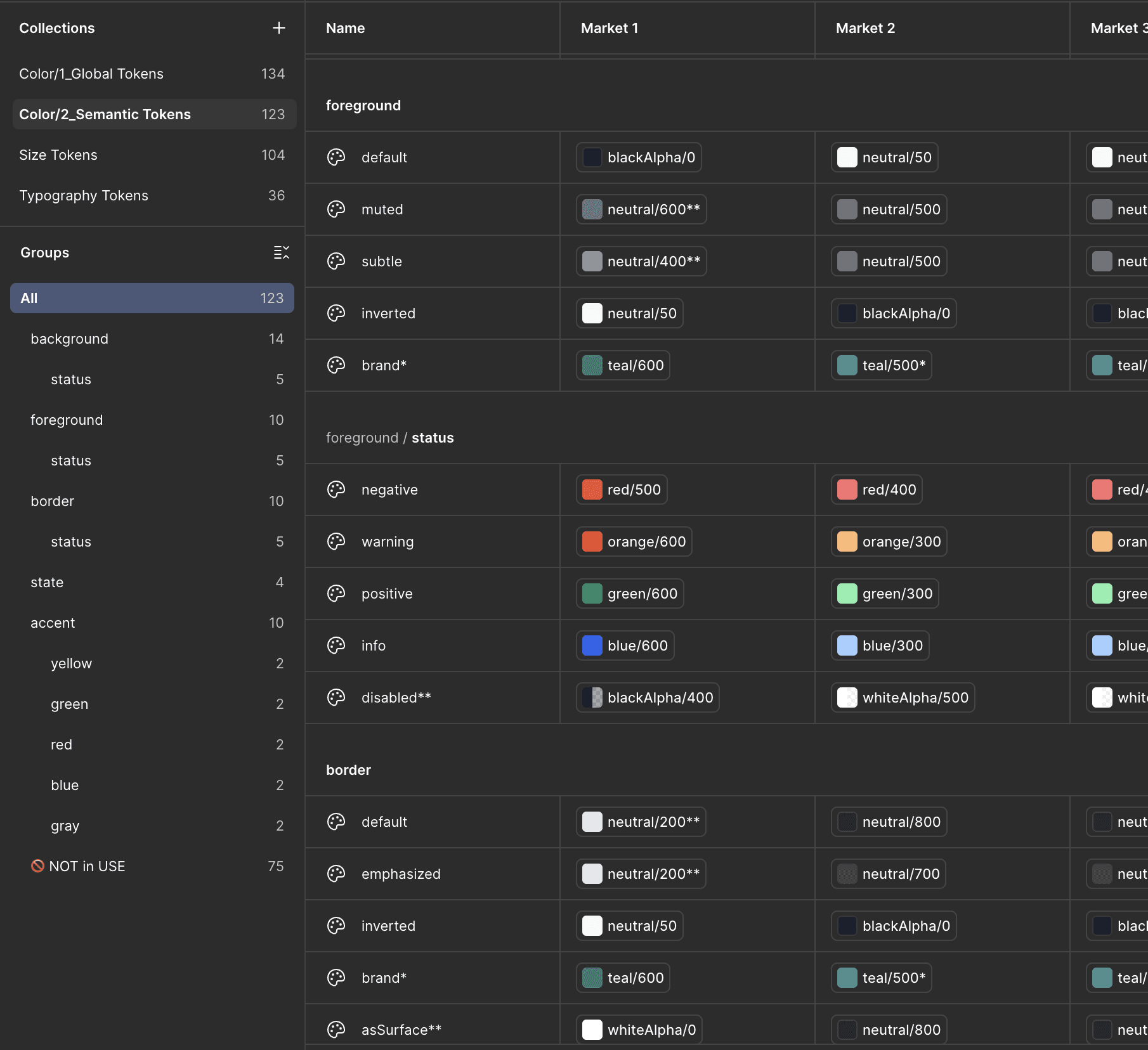
Level 2 Semantic Tokens (Meaning & Usage)
👉

Tokens described context, not appearance.

👉

Tokens described context, not appearance.

👉

Existing colors were treated as primitives.

👉

Example color/foreground/brand → teal/600

👉

Example color/foreground/brand → teal/600

👉

Each color group had shades from 50 to 950.

👉

Simplified background/foreground structure removed the need for separate text and icon tokens.

👉

Simplified background/foreground structure removed the need for separate text and icon tokens.

👉

This preserved existing component connections and created reusable value reserves.

The Figma variables screenshot shows the color organization of semantic tokens (level 2).

Result

This resulted in an intuitive, scalable structure and allowed one-click palette changes per market in Figma.

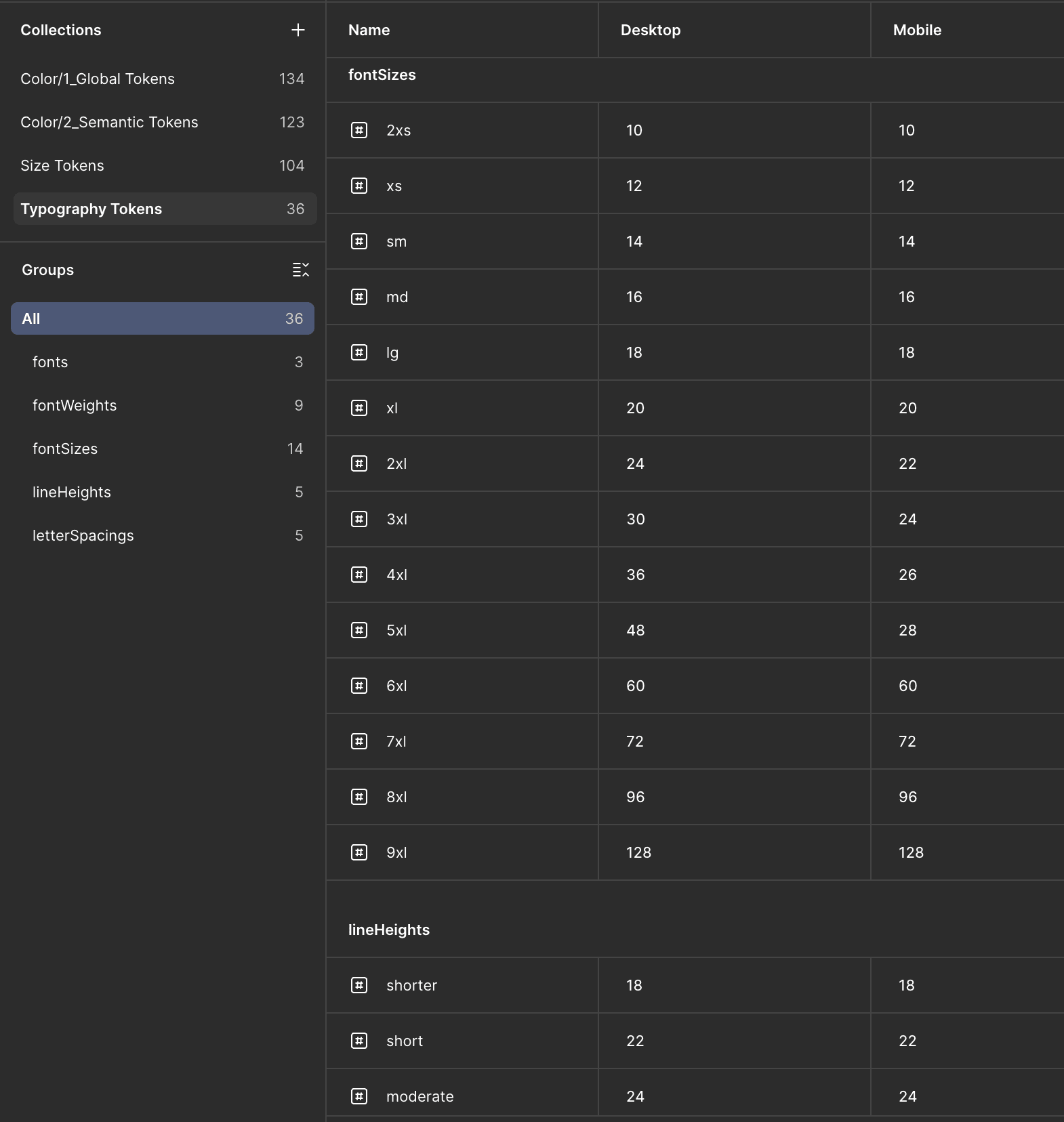
Typography tokenization

This solved the issue of manual responsive typography switching.
👉

Typography scale was recreated using Variables.

👉

Typography scale was recreated using Variables.

👉

Each color group had shades from 50 to 950.

👉

Desktop values were assigned first.

👉

Desktop values were assigned first.

👉

This preserved existing component connections and created reusable value reserves.

👉

A Mobile mode was added with mapped equivalents (e.g. H3 Desktop 48 → Mobile 36).

👉

A Mobile mode was added with mapped equivalents (e.g. H3 Desktop 48 → Mobile 36).

👉

Variables were connected to existing text styles without visual changes.

👉

Variables were connected to existing text styles without visual changes.

The Figma variables screenshot shows the typography organization.
The process of fixing the checkbox component without breaking connection with instances

From this point, switching Desktop ↔ Mobile automatically updated all font sizes.

3

3

System build (Execution & Automation)

This was the technical phase where variables were implemented, bugs fixed, and missing states added.

👉

Icons were fixed first due to scaling and color issues.

👉

Icons were fixed first due to scaling and color issues.

👉

Each color group had shades from 50 to 950.

👉

Atomic Design was used to validate changes across complexity levels.

👉

Atomic Design was used to validate changes across complexity levels.

👉

This preserved existing component connections and created reusable value reserves.

👉

WCAG contrast issues were corrected (3:1 UI, 4.5:1 text).

👉

WCAG contrast issues were corrected (3:1 UI, 4.5:1 text).

👉

Each component passed QA based on defined criteria.

👉

Each component passed QA based on defined criteria.

The process of fixing the checkbox component without breaking connection with instances

4

4

New ways of working (Governance & Quality)

To ensure long-term stability, I created documentation as a Single Source of Truth.

👉

GenAI was used to draft documentation, which was then reviewed and finalized manually

👉

GenAI was used to draft documentation, which was then reviewed and finalized manually

👉

Each color group had shades from 50 to 950.

👉

Each component description included

👉

Each component description included

👉

This preserved existing component connections and created reusable value reserves.

Name

Name

Each color group had shades from 50 to 950.

Overview

Overview

This preserved existing component connections and created reusable value reserves.

Anatomy

Anatomy

This preserved existing component connections and created reusable value reserves.

Usage behavior

Usage behavior

This preserved existing component connections and created reusable value reserves.

Do’s & Don’ts

Do’s & Don’ts

This preserved existing component connections and created reusable value reserves.

Variants

Variants

This preserved existing component connections and created reusable value reserves.

Optional features

Optional features

This preserved existing component connections and created reusable value reserves.

Figma’s Specs plugin was used for visual documentation.

Solution

Faster market adaptation

Variable Modes enabled automatic brand switching.

Faster market adaptation

Variable Modes enabled automatic brand switching.

Faster market adaptation

Each color group had shades from 50 to 950.

Stable and predictable releases

File versioning removed chaos and simplified cooperation.

Stable and predictable releases

File versioning removed chaos and simplified cooperation.

Stable and predictable releases

Each color group had shades from 50 to 950.

Reduced design debt

Removal of duplicates and legacy components improved maintainability.

Reduced design debt

Removal of duplicates and legacy components improved maintainability.

Reduced design debt

Each color group had shades from 50 to 950.

40% reduction of unused tokens and styles

Library cleanup simplified the system.

40% reduction of unused tokens and styles

Library cleanup simplified the system.

40% reduction of unused tokens and styles

Each color group had shades from 50 to 950.

Better cross-team collaboration

Shared naming eliminated design–code gaps.

Better cross-team collaboration

Shared naming eliminated design–code gaps.

Better cross-team collaboration

Each color group had shades from 50 to 950.

Product UX Impact

Consistent interfaces across platforms

Tokenization removed visual differences.

Consistent interfaces across platforms

Tokenization removed visual differences.

Consistent interfaces across platforms

Each color group had shades from 50 to 950.

30% faster design screens delivery

Automation removed repetitive and boring tasks.

30% faster design screens delivery

Automation removed repetitive and boring tasks.

30% faster design screens delivery

Each color group had shades from 50 to 950.

Faster designer onboarding

Clear structure and documentation reduced warm-up time.

Faster designer onboarding

Clear structure and documentation reduced warm-up time.

Faster designer onboarding

Each color group had shades from 50 to 950.

Increased trust in the Design System

Teams adopted it as a true Single Source of Truth.

Increased trust in the Design System

Teams adopted it as a true Single Source of Truth.

Increased trust in the Design System

Each color group had shades from 50 to 950.

WCAG 2.1 compliance

Improved contrast, focus states, and typography.

WCAG 2.1 compliance

Improved contrast, focus states, and typography.

WCAG 2.1 compliance

Each color group had shades from 50 to 950.

More predictable UX

Unified rules improved interaction clarity.

More predictable UX

Unified rules improved interaction clarity.

More predictable UX

Each color group had shades from 50 to 950.

What I learned from this project

Sell efficiency, not aesthetics

Business language (technical debt, Time-to-Market) was key to buy-in.

Sell efficiency, not aesthetics

Business language (technical debt, Time-to-Market) was key to buy-in.

Sell efficiency, not aesthetics

Each color group had shades from 50 to 950.

Token architecture is essential for scale

Semantic tokens are the only way to support multi-market branding.

Token architecture is essential for scale

Semantic tokens are the only way to support multi-market branding.

Token architecture is essential for scale

Each color group had shades from 50 to 950.

Real value is in code implementation

A Design System matters only if developers can use it easily.

Real value is in code implementation

A Design System matters only if developers can use it easily.

Real value is in code implementation

Each color group had shades from 50 to 950.

Audits are business tools

Data and metrics justified time and resource investment.

Audits are business tools

Data and metrics justified time and resource investment.

Audits are business tools

Each color group had shades from 50 to 950.

Structural simplicity beats over-detail

Simplified foreground and background tokens improved usability.

Structural simplicity beats over-detail

Simplified foreground and background tokens improved usability.

Structural simplicity beats over-detail

Each color group had shades from 50 to 950.

Design System is a product

Designers and developers are its users.

Design System is a product

Designers and developers are its users.

Design System is a product

Each color group had shades from 50 to 950.

Early partnership with engineers

Shared taxonomy closed the Design–Dev gap and accelerated delivery.

Early partnership with engineers

Shared taxonomy closed the Design–Dev gap and accelerated delivery.

Early partnership with engineers

Each color group had shades from 50 to 950.

Made with love 💕 by Me.

© Copyright 2026

Made with love 💕 by Me.

© Copyright 2026

Made with love 💕 by Me.

© Copyright 2026